Category based custom fields in Dokan allow marketplace owners to display specific ACF field groups based on selected product categories. With this new taxonomy term rule feature, you can control which custom fields appear on the vendor dashboard, creating a cleaner and more relevant product submission experience.
Setting Up Category Based Custom Fields in Dokan Using ACF
With this new feature, you can:
- Apply post taxonomy rules inside ACF field group settings
- Show specific field groups only when a product belongs to certain categories
- Hide irrelevant fields from vendors automatically
- Create a cleaner and smarter product submission experience
In simple terms:
Vendors only see the custom fields that are relevant to the product category they select.
Why You Need Category Based Custom Fields in Dokan
Not all products need the same information.
For example:
- Electronics may require: Warranty period, Voltage, Brand
- Clothing may require: Fabric type, Size chart, Care instructions
- Books may require: Author, ISBN, Publisher
Before this update, this had to be managed using the custom code with Dokan category selection hook. Now, with taxonomy-based rules, you can ensure that only relevant field groups appear without any code.
This results in:
- Cleaner vendor dashboard
- Better data accuracy
- Faster product submission
- Improved user experience
How Category Based Custom Fields in Dokan Work
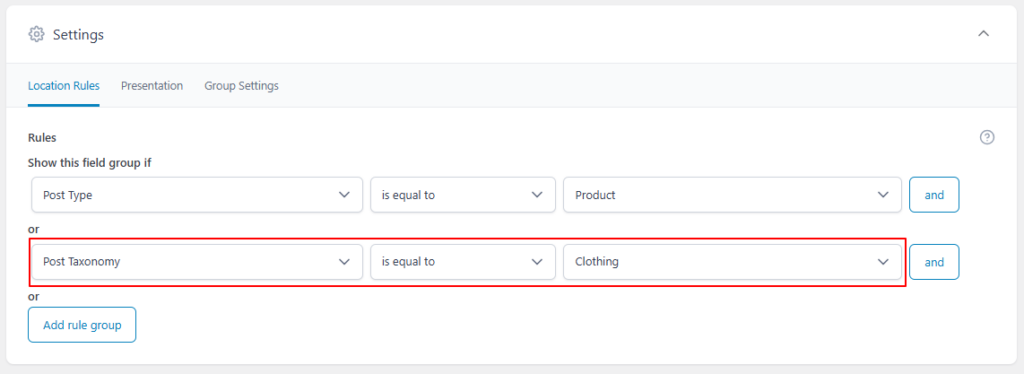
The feature uses Post Taxonomy conditions defined inside your ACF Field Group rules.
Example rule setup:
- Show this field group if:
- Post Type is equal to Product
- Post Taxonomy is equal to “Clothing”
When a vendor selects “Clothing” while creating or editing a product in the Dokan dashboard, the relevant ACF field group becomes visible automatically.
Real-World Example
Let’s say your marketplace sells:
- Electronics
- Furniture
- Apparel
You can create:
- A “Technical Specifications” field group → visible only for Electronics
- A “Material & Dimensions” field group → visible only for Furniture
- A “Size & Fabric Details” field group → visible only for Apparel
Each vendor sees only what’s relevant to their product category.
Works Seamlessly With Vendor Permissions
This feature works perfectly alongside:
- Vendor edit restrictions
- Category-based product rules
- Conditional logic inside ACF
- Multiple field groups per product
You stay in full control of what vendors can see and edit.
Fully Compatible With
- WooCommerce products
- Multiple ACF field groups
- Category-based marketplace structures
- Dokan product creation and edit pages
Who Should Use This?
This feature is ideal for:
- Large marketplaces with diverse product types
- Niche marketplaces with strict data requirements
- Admins who want structured and category-specific product information
- Marketplace owners focused on improving vendor UX
Final Thoughts
The new Taxonomy Term Rule Support makes ACF for Dokan PRO smarter, cleaner, and more powerful.
By displaying field groups based on selected taxonomy terms, you can now create a highly dynamic and professional vendor dashboard experience.
If you’re already using ACF for Dokan PRO, this feature is available in the latest update. This update makes category based custom fields in Dokan easier than ever. If not, now is the perfect time to upgrade your marketplace flexibility.